A convenient launcher that supports mods

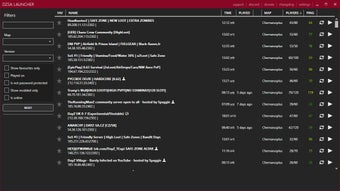
DayZ SA Launcher is a third-party launcher for DayZ with unofficial mod support. The launcher is known for its ability to automatically download and manage all required mods for community servers that you’re joining. This free app requires an officially purchased copy of DayZ for it to work.

Simplify installation of custom content

DayZ SA Launcher is a handy tool, especially for DayZ players who love playing with mods and adding custom content to their game. When joining a modded server, the launcher automatically installs every single mod you’re missing for the server, very convenient for those who aren’t familiar with installing mods.

You can even manage all installed mods via the Mod Menu; it has a recycle button for checking updates, and it has a trash bin icon for deleting mods you no longer want or need. The launcher also prides itself on faster loading times compared to the official launcher.

Perfect for DayZ mod lovers

In conclusion, DayZ SA Launcher is highly recommended for those who enjoy using mods and playing around with custom content, since this launcher streamlines the installation process for all mods. However, since this is an unofficial launcher, you should expect compatibility issues whenever the game gets updated.

  • Pros

    • Installs missing mods automatically
    • Has a Mod Manager menu
    • Faster loading times than official the launcher
  • Cons

    • Game updates can lead to compatibility issues
 0/1

App specs

  • License

    Free

  • Version

    0.0.5.8
  • Latest update

  • Platform

    Windows

  • OS

    Windows 11

  • Language

    English

    Available languages

    • Arabic
    • Chinese
    • Dutch
    • English
    • French
    • German
    • Italian
    • Japanese
    • Korean
    • Polish
    • Portuguese
    • Russian
    • Spanish
    • Swedish
    • Turkish
  • Downloads

    24.6K

    Last month's downloads

    • 1.5K
  • Size

    8.14 MB

  • Developer

Program available in other languages


User reviews about DayZ SA Launcher

Have you tried DayZ SA Launcher? Be the first to leave your opinion!

Add review

You may also like

Alternatives to DayZ SA Launcher

Explore Apps

Latest articles

Laws concerning the use of this software vary from country to country. We do not encourage or condone the use of this program if it is in violation of these laws.
Softonic

Is DayZ SA Launcher safe?

100/100

Score result: Clean

This file passed a comprehensive security scan using VirusTotal technology. It is safe to download.

  • Virus free
  • Spyware free
  • Malware free
  • Verified by Security Partners

    VirusTotal logo

Scan Info

Last scan
Friday, October 24, 2025
Scan provider
VirusTotal · Full report

File Integrity

File
setup_dzsalauncher-0.0.5.8.exe
SHA256
0323731b0eb793b2f38db1bf9e27130db1518efbfc353c4a3339e47ea574243b
SHA1
46b0fa8845bf500e38ff6757468515de6f9ff87b

Softonic security commitment

DayZ SA Launcher has been thoroughly scanned by our advanced security systems and verified by industry-leading partners. This file comes from the official developer and has passed all our security checks, showing no signs of viruses, malware, or spyware. For more information, visit our Security and Trust Center